Minitutorial animation curves. 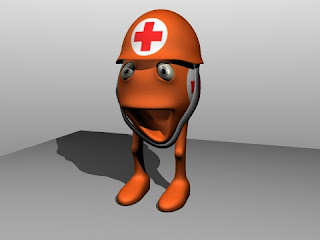
lunar
The laboratory is in full swing. We have a new character (you'll discover its role in history, sooner or later), a clone of bipedal green RedCro provisional name, where I used shapekey for animation curves. In this case it was to animate the strap of the helmet, which I tried to follow the movement of the jaw when a character opens his mouth.
We translate in Italian that I learned from a tutorial in English, although in the edit buttons (F9) do not see anything that allows you to create shapes for the curves, there is an alternative procedure
quite simple.
Take the curve that you want to animate, in object mode is set by pressing a first key for the Insert Key, and choose Curves. So we set the key basis. Then we can set all the keys that I still want to reward and repeating the selection curves.
Then we open an IPO window and choose to view the IPO of Shapes. Selecting the key base, the one without name with dashes (just click on it) we will see a series of horizontal lines, as there are key settings, including the base that will appear with the others.
Now we select a key ...
... and we go into edit mode by making the necessary changes.
Leaving Edit Mode you can select another key, also change that, and so on. The key thus obtained can be used like any other Shape Key directly in the Action Editor (ShapeKey selecting the editor and using the sliders).
We are also experimenting on the environment, lights, glow effects with compositing nodes, but again, folks.
Meanwhile, the blues runs wild ... ... And the blues is life!


